本文是 All In One HomeLab 虚拟化 iKuai + Mihomo 的 IPv6 扩展配置,介绍如何在现有的透明网关(Debian/LXC 作为 Clash/Mihomo 透明网关)架构中启用 IPv6 支持。
本文默认目标:只让透明网关本机具备 IPv6 出口能力,内网终端不强制获取公网 IPv6;如果希望终端也能拿到公网 IPv6,通常还需要额外处理 NDP 或 前缀下发(DHCPv6-PD) 等问题,正文相关步骤会顺带提示。
iKuai IPv6 配置
WAN1 配置 IPv6
确保 iKuai 的主外网口(WAN1)能够获取 IPv6 地址:
- 如果是 PPPoE 拨号:在 iKuai 的 WAN1 设置中,勾选 “获取 IPv6” 选项。
- 如果是 DHCP:确保光猫支持 IPv6 并已开启 IPv6 功能,iKuai 会自动获取 IPv6 前缀和地址。
LAN 口配置 IPv6(推荐无状态 / 混合)
最容易踩坑的点:如果 iKuai 只开“有状态 DHCPv6”,而透明网关用的是
iface wan0 inet6 auto(SLAAC/无状态),它默认不会去跑 DHCPv6 客户端,最终表现就是“怎么都拿不到 IPv6”。
Debian 是透明网关(必须开 net.ipv6.conf.all.forwarding=1),更推荐让 iKuai 在 LAN 侧提供 RA + SLAAC(无状态),或者 混合模式(SLAAC + DHCPv6):
- 进入 网络设置 > LAN1 > IPv6 设置
- 外网接口:动态接口;绑定
wan1 - 内网接口:
- 模式:选择 无状态 或 混合(无状态 + 有状态)
- RA 发送:开启(默认网关/前缀等信息主要依赖 RA)
- M(Managed)标识:建议 关闭(M=1 会暗示“用 DHCPv6 拿地址”;Android 不支持有状态 DHCPv6)
- O(Other)标识:建议 开启(用于下发 DNS 等其他信息,具体取决于 iKuai 的实现)
- 外网接口:动态接口;绑定
如果希望“终端设备也能拿公网 IPv6”,至少要保证 LAN 侧能 SLAAC(无状态)或混合模式(否则 Android 直接拿不到 IPv6 地址);另外在“透明网关/旁路网关”这种拓扑里,终端要真正拥有公网 IPv6,往往还会遇到 NDP 或 前缀下发(PD) 的问题:
- NDP:常见做法是在 Debian 上做 NDP 代理(例如
ndppd),让上游认为下游终端“就在同一链路”。 - PD:更正统的做法是上游支持 DHCPv6-PD,让 Debian 申请一个子前缀(例如 /64)再分配给下游 LAN。
如果“只想让透明网关这一台设备拿 IPv6”,两种做法:
- 做法 A(更省心):仍然用 无状态/混合,但在 iKuai 上用 IPv6 防火墙策略限制终端的 IPv6 出口(让它们即便拿到 IPv6,也访问不了公网)。
- 做法 B(坚持有状态 DHCPv6):继续用 DHCPv6 白名单 只给网关发地址,但请注意 Debian 侧要改成 DHCPv6 客户端,见下文“有状态方案”。(参考:特定设备分配 IPv6)
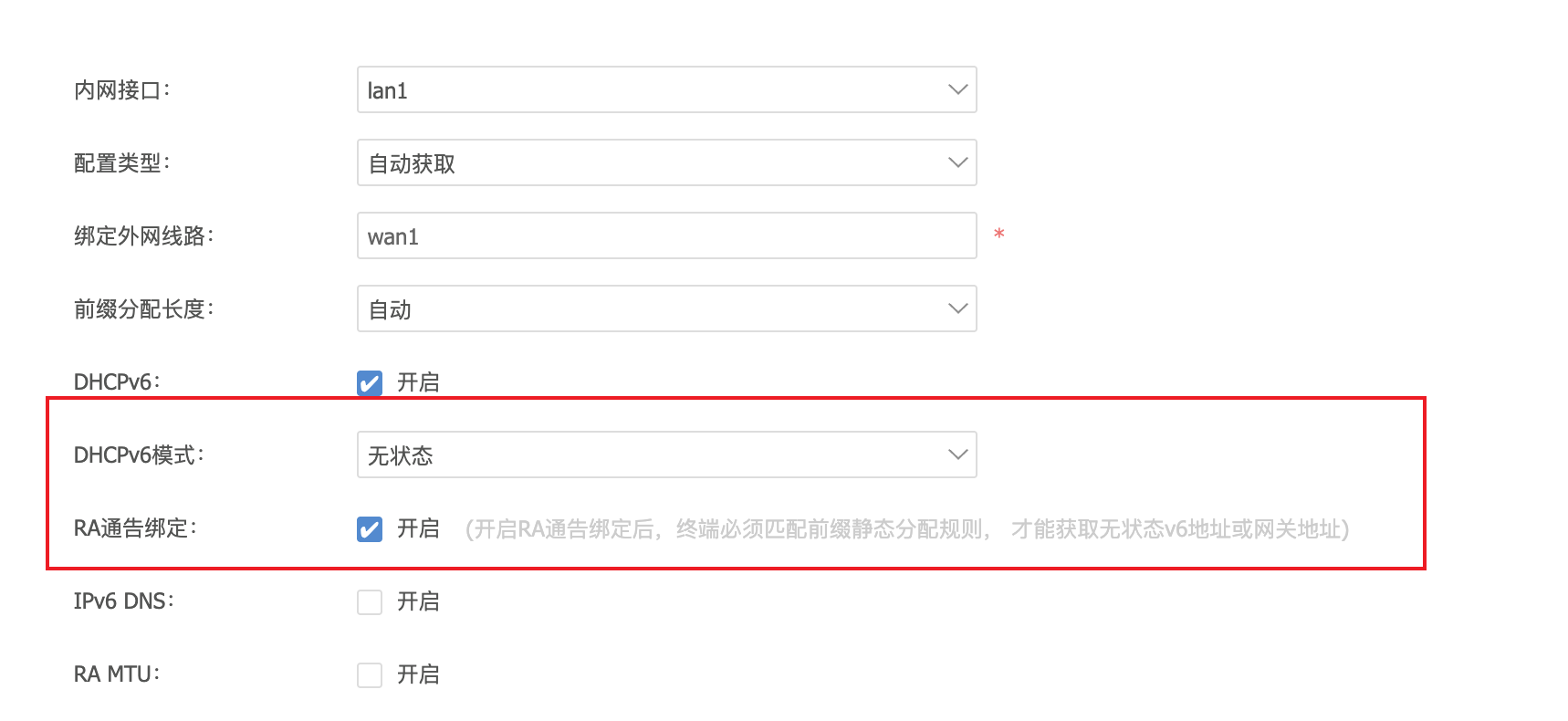
透明网关 IPv6 配置
方案 1:无状态 或者 混合(推荐)
编辑 /etc/network/interfaces,为 wan0(连接到 iKuai LAN)启用 SLAAC,并在“网关/转发模式”下强制接受 RA(透明网关必开 forwarding=1,Linux 默认会停止接收 RA;不收 RA 往往拿不到 IPv6 默认路由):
auto lo
iface lo inet loopback

auto lan0
iface lan0 inet static
        address 192.168.200.1/24
        gateway 192.168.200.2

auto wan0
iface wan0 inet static
        address 192.168.100.2/24

# 无状态(SLAAC)获取 IPv6 地址
iface wan0 inet6 auto
        # 关键:作为网关开启 forwarding 后,Linux 默认不再接受 RA,需要设为 2
        post-up sysctl -w net.ipv6.conf.wan0.accept_ra=2
应用配置:
systemctl restart networking
方案 2:iKuai 纯有状态 DHCPv6(不推荐,但可用)
如果在 iKuai 上做了 DHCPv6 白名单,只给透明网关发 IPv6,那么 Debian 侧就别用 inet6 auto 了,改成 DHCPv6:
auto wan0
iface wan0 inet static
        address 192.168.100.2/24

# 有状态 DHCPv6 获取 IPv6 地址(需要 DHCPv6 客户端)
iface wan0 inet6 dhcp
        post-up sysctl -w net.ipv6.conf.wan0.accept_ra=2
说明:即使用 DHCPv6 拿到了地址,默认路由通常仍依赖 RA,所以
accept_ra=2依然很关键。
PVE 特殊配置
如果是 PVE LXC 容器记得调整 LXC 配置,否则重启后 network 配置会被重置
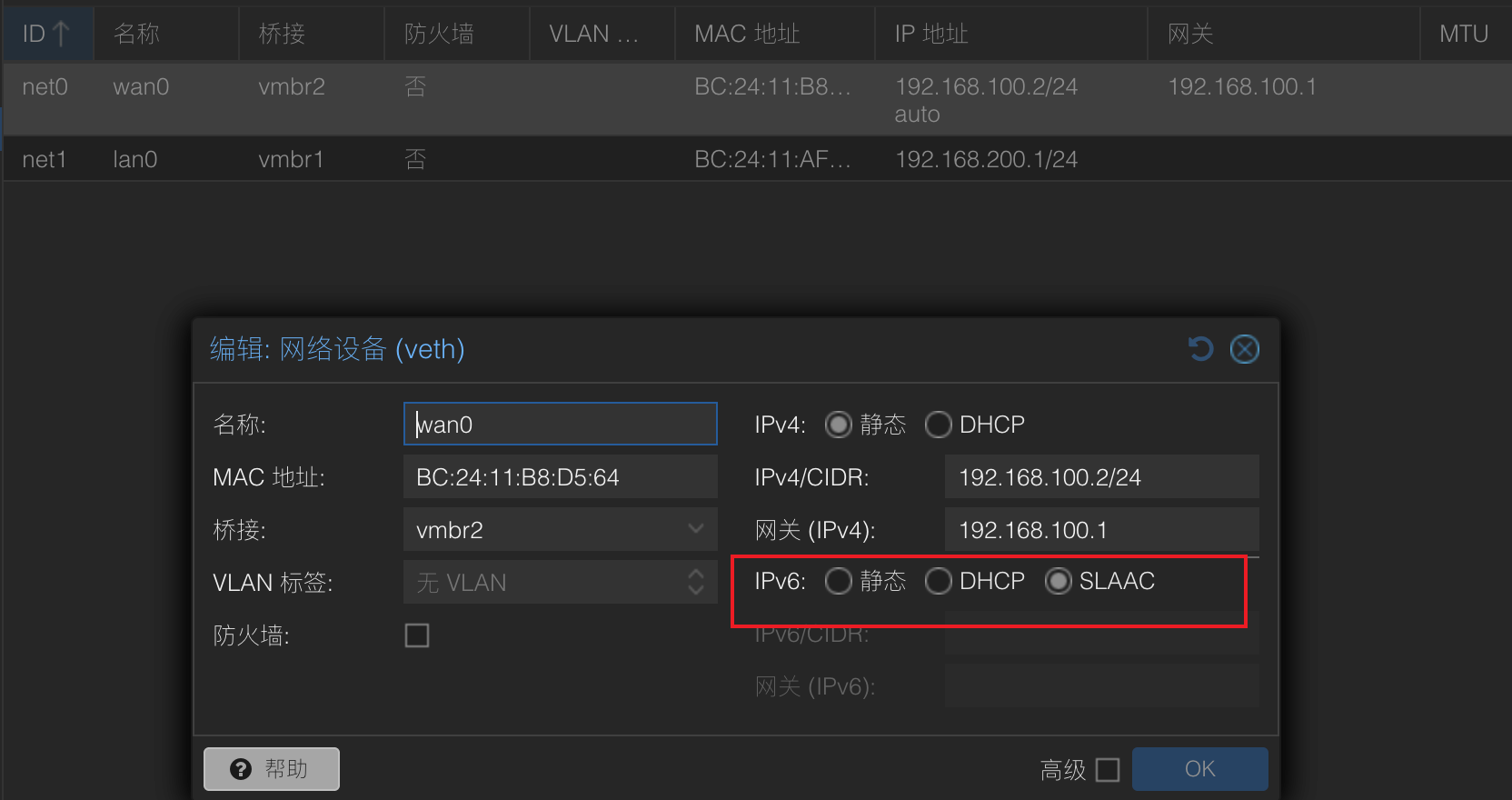
开启内核转发(关键)
既然是透明网关,Debian 必须开启 IPv6 转发功能。编辑 /etc/sysctl.conf:
# 作为路由/网关:开启 IPv6 转发
net.ipv6.conf.all.forwarding=1
net.ipv6.conf.default.forwarding=1

# 仅在要做 NDP 代理时才需要
# net.ipv6.conf.all.proxy_ndp=1
应用配置:
sysctl -p
验证 IPv6 地址获取
检查透明网关是否成功获取 IPv6 地址和默认路由:
# 查看 wan0 的 IPv6 地址
ip -6 addr show wan0

# 查看 IPv6 路由表(重点看 default)
ip -6 route show

# 测试 IPv6 连通性
curl -6 ifconfig.me
Mihomo IPv6 支持
配置 IPv6 DNS
编辑 /etc/mihomo/config.yaml,添加 IPv6 DNS 服务器:
dns:
  enable: true
  listen: 0.0.0.0:1053
  ipv6: true  # 启用 IPv6 DNS 查询
...